
The Process
How Isla Bella Works
From your event vision to a complete, professional invitation suite — in seven steps.
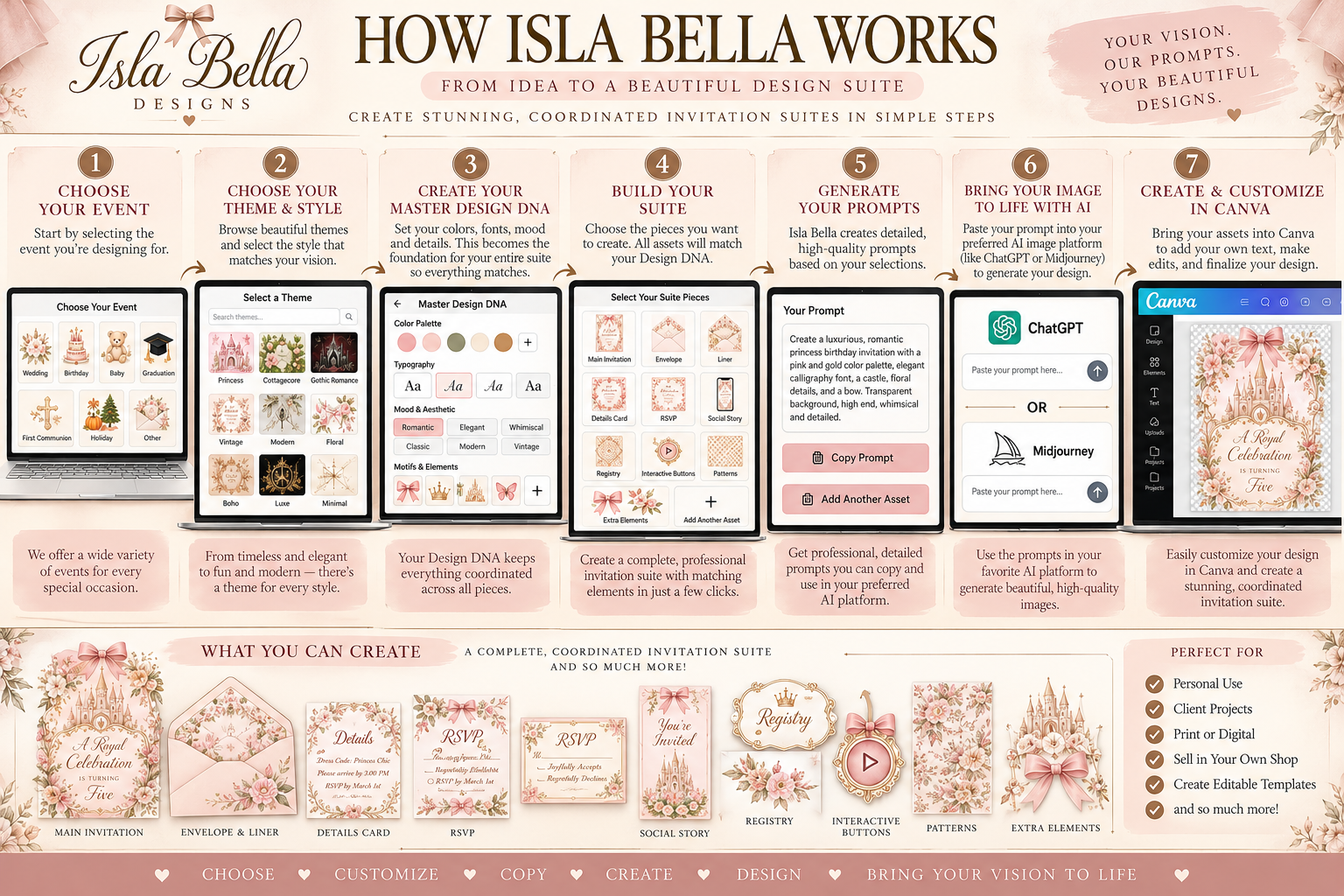
Step by Step
The Full Workflow
Every step is designed to give your AI the exact information it needs to produce professional, cohesive results.
Choose Your Event & Theme
Start by selecting your event type — birthday, wedding, baby shower, quinceañera, holiday, and more. Then browse 86 curated themes across 14 signature collections. Each theme carries a distinct aesthetic, mood, and art direction built specifically for that event.
Every theme in the Isla Bella library has been crafted with a specific visual world in mind — from Victorian Royale to Tropical Luxe to Enchanted Forest. You're not picking a color; you're choosing an entire design universe.
Build Your Master Design DNA
Walk through the 22-step Build Your Suite wizard. Each step refines your design direction — art style, color palette, typography, decorative elements, background, formality, invitation shape, and more.
The wizard collects every design decision and assembles them into your Master Design DNA — a locked, comprehensive visual brief that coordinates every piece in your suite. Nothing is left to chance.
Select Your Suite Assets
Choose which pieces to include: main invitation, envelope liner, RSVP card, thank you card, place cards, menus, programs, social media graphics, signage, and more — 42 asset types in total.
Every asset in your suite is generated from the same Master Design DNA, so every piece coordinates perfectly. Mix and match exactly what your event needs.
Generate Your AI Prompts
The Prompt Studio generates a unique, production-ready AI prompt for every asset you selected. Each prompt is pre-loaded with your full Design DNA — art style, palette, typography direction, composition, mood, and more.
These are not generic prompts. Every prompt opens with your full art style block and is tailored to the specific asset type — the Main Invitation prompt includes silhouette shape, safe areas, layering instructions, and print specifications. Copy any prompt in one click.
Generate in Your AI Tool
Paste your prompts into your preferred AI image generator — Midjourney, Adobe Firefly, DALL·E, Stable Diffusion, or any other tool. The prompts are written to produce professional, print-ready results.
Isla Bella prompts are engineered for maximum quality. They specify resolution targets, bleed areas, color fidelity, and design intent so your AI tool produces assets that are sharp, detailed, and ready for production.
Assemble in Canva
Import your AI-generated assets into Canva. Use the Isla Bella Canva Guide for step-by-step assembly instructions — how to set up artboards, place elements, add your event details, and export at print resolution.
Canva's drag-and-drop editor makes it easy to add your names, dates, venue, and personal details to each piece. Export as high-resolution PDF for print or PNG for digital delivery.
Deliver or Sell Your Suite
Deliver your finished suite directly to your client, or list it on Etsy, Creative Market, or your own shop. Isla Bella members keep 100% of what they earn.
Whether you're designing for yourself, for clients, or building a stationery business, Isla Bella gives you the tools to produce professional-quality invitation suites at a fraction of the time and cost of traditional design.
What You Get
Everything in One Membership
One lifetime payment. Every tool, every theme, every asset type — forever.
86 curated themes
across 4 event groups
14 signature collections
editorial, seasonal & specialty
42 asset types
invitations, envelopes, signage, social & more
22-step Build wizard
full Design DNA generation
Prompt Studio
one-click copy for every asset
Invitation Shape library
75 shapes across 8 categories
My Projects
save, duplicate & manage suites
Canva assembly guide
step-by-step production workflow
Up to 10 new suites / 24 hrs
existing projects never count
Lifetime access
one payment, no subscription
Questions
Common Questions
Do I need design experience?
No. The wizard guides you through every decision step by step. If you can describe what you want, Isla Bella can build the prompt for it.
Which AI tools work with Isla Bella prompts?
Midjourney, Adobe Firefly, DALL·E 3, Stable Diffusion, and most major image generation tools. The prompts are written to be tool-agnostic.
Can I use the assets commercially?
Yes. Assets you generate using Isla Bella prompts are yours to use, sell, and deliver to clients. Check your AI tool's terms for their specific commercial use policy.
How many suites can I build?
Up to 10 new suites every 24 hours. Existing projects don't count against the limit — you can continue working on saved projects at any time.
What is the Master Design DNA?
It's the locked visual brief that coordinates your entire suite. It captures your art style, color palette, typography direction, composition style, mood, decorative elements, and more — everything an AI needs to produce cohesive, on-brand assets.
Can I save and come back to a project?
Yes. Every project is auto-saved as you work. Access all your projects from My Projects at any time.
More questions?
Visit the full FAQReady to Begin
Start Building Your Suite
One lifetime payment. Every theme, every asset, every prompt — yours forever.